Day-3: Basic Linux Shell Scripting for DevOps Engineers.
AWS || git || Linux || networking || DevOps || Docker || Git || Kubernates || Terraform || Jenkins || Ansible || Jira || Prometheus || Grafana ||
• What is Kernel..?
\> A kernel is a central component of an operating system that acts as an interface between the user applications and the hardware.
\> The aim of the kernel is to manage the communication between the software (user level applications) and the hardware (CPU, disk memory etc).
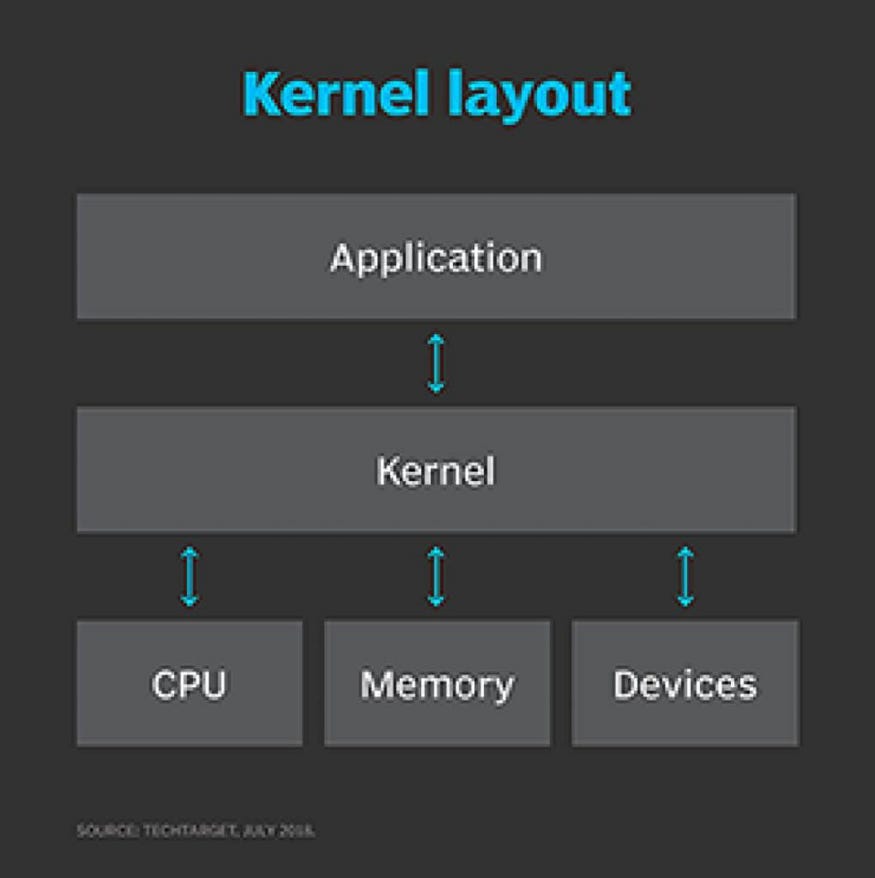
- Types of kernels:-
⁃ Microkernels
⁃ Monolithic kernels
⁃ Hybrid kernels
• What is Shell..?
• A shell is a program that takes commands typed by the user and calls the operating system to run those commands.
• A shell is a program that acts as the interface between you and the Linux system, allowing you to enter commands for the operating system to execute.
• Shell accepts your instruction or commands in English and translate it into computers native binary language.

*Shell Keywords:-

Shell Keywords
• What is Linux Shell Scripting in DevOps..?
\> Usually shells are interactive that mean, they accept command as input from users and execute them. However some time we want to execute a bunch of commands routinely, so we have type in all commands each time in terminal.
\> As shell can also take commands as input from le we can write these commands in a le and can execute them in shell to avoid this repetitive work. These files are called Shell Scripts or Shell Programs. Shell scripts are similar to the batch file in MS-DOS. Each shell script is saved with .sh file extension eg. myscript.sh
\> A shell script have syntax just like any other programming language. If you have any prior experience with any programming language like Python, C/C++ etc. it would be very easy to get started with it.
- A shell script comprises following elements –
⁃ Shell Keywords — if, else, break etc.
⁃ Shell commands — cd, ls, echo, pwd, touch etc.
⁃ Functions
⁃ Control flow — if..then..else, case and shell loops etc.
• What is #!/bin/bash? Can we write #!/bin/sh as well..?
\> #!/bin/bash is known as shebang in Unix. Shebang is a collection of characters or letters that consist of a number sign and exclamation mark, that is (#!) at the beginning of a script. As discussed in the introduction part, the main function of a shell is to interpret the UNIX commands given by the user. Unix consists of numerous shells out of that bash is one of them that is widely used. It is the default shell assigned by Linux-based operating systems.
\> A script comprises several UNIX commands. Now, in each of the scripts, users are required to explicitly specify the type of shell they want to use to run their scripts. Now to explicitly specify the type of shell used by the script, Shebang is used. So we can use shebang, that is, #!/bin/bash at the start or top of the script to instruct our system to use bash as a default shell.
\> Let us consider it with the help of an example. A script is nothing but several commands. In the below example, the first line of the script starts with a hash (#) and an exclamation mark (!). It basically instructs the operating system to use Bash as a default shell to run the script. In the second line, we are printing “Hello World!” to the console.
Example:
// Using shebang to specify the OS to
// use bash shell
// myScript.sh
Cmd:
#!/bin/bash
# Bash script
echo “Hello World!”
Output:

#!/bin/sh:- (command)
#!/bin/sh: It is used to execute the file using sh, which is a Bourne shell, or a compatible shell.
Just like that, we have #!/bin/csh. It is used to execute the file using csh, the C shell, or a compatible shell.
• Write a Shell Script which prints “I will complete#90DaysOofDevOpschallenge”..?
⁃ Here it show the 1st one output is showing in next line, whereas in 2nd one, output is showing in same line itself. Also for variables, in 2nd example ,

• Write a Shell Script to take user input, input from arguments and print the variables..?


Outputs
